Build a neural network by hand.
Watch it learn.

A visual environment for designing, training, and monitoring neural networks on Apple Silicon.

Coming soon to the Mac App Store See pricing

Thirty days free. One payment for good.

ADDBatch Normbatch_normDense LayermatmulBiasbias_addDropoutdropoutAttentionattentionLayer Normlayer_normEmbeddingembeddingSoftmaxsoftmaxSpectrogramspectrogramInputsource · 64 × 784Dense Layermatmul · 64 × 128grad 7.6e-4Outputoutput · a class, shownResult a sevenDense Layermatmul · fully connected PicturesimageSoundaudioTexttextA tabletensor InputConvolutionReLUImage classifierInputEmbeddingPositional EncodingLanguage modelEXPORTExport As Swift…Export To Core ML…Export To ONNX…Export To PyTorch… Selica

Build a neural network by hand.
Watch it learn.

A visual environment for designing, training, and monitoring neural networks on Apple Silicon.

Coming soon to the Mac App Store See pricing

Thirty days free. One payment for good.

Observation is the product

Neural networks are usually invisible.

You write some code, you run it, you get a number, and if the number is wrong you have very little to go on. Selica starts from the other end, and without a line of code: you build the network by placing and connecting nodes, it is a picture from the first one, and everything that happens while it trains is drawn onto that picture.

  • No code to write, to design, train or export a model.
  • A layer that has stopped learning shows it.
  • A gradient that has blown up shows it.
  • The layer that is eating all the time shows it.

You do not write a script or read a log; you look.

Templates and examples

Start from a model that already works.

Nineteen templates, each a working model with a note on the canvas explaining how it is built and what to try, and each naming public datasets that fit it. Open one, point it at data, press Train. Beside them are ten worked examples – a gesture trainer, a whistle synth, a beat follower and more – each a complete build with its own story.

Image classifiera folder of pictures, a subfolder per class
Object detectorpictures with YOLO, COCO or VOC boxes
Video classifierframes per class; a video, frame by frame
Regressiona CSV of numbers, the answer last
Tabular classifiera CSV of numbers, the class last
Recommendera table of user, item, rating
Forecastingone value per row, the next predicted
Time-series classifiera whole series per row, read in order
MIDI continuationa .mid file or an instrument, the next step played
Text classifierlabelled text, from averaged embeddings
Transformer text classifierthe same text, read with attention
Autoencoderpictures, no labels, rebuilt
Language modela plain-text file, continued one character at a time
Image generatorpictures in class folders; a new one drawn from noise of a class you name
Sound classifierrecordings in class folders, read as spectrograms
Denoising autoencoderpictures corrupted on the way in, scored on the clean ones
Boltzmann machinepictures with no labels, learned by contrastive divergence
Markov chaina text file; the next character from the current one
Hidden Markov modela text file; the hidden state behind every symbol
Bring your own data

In whatever shape it comes.

A folder of pictures sorted into subfolders. A CSV of measurements. A book as a text file. A folder of recordings, or of MIDI files, or an archive of any of them. Drop it on a model and Selica probes it: what format it is, where the samples are, whether there are labels and where they live. It wires the inputs, and Fit Model to Data resizes the layers to what it found; pictures of mixed sizes are resized to the size the model declares. Selica ships no dataset of its own.

  • Shapes and types are checked as you edit, by sixty-four rules, each explained in Help
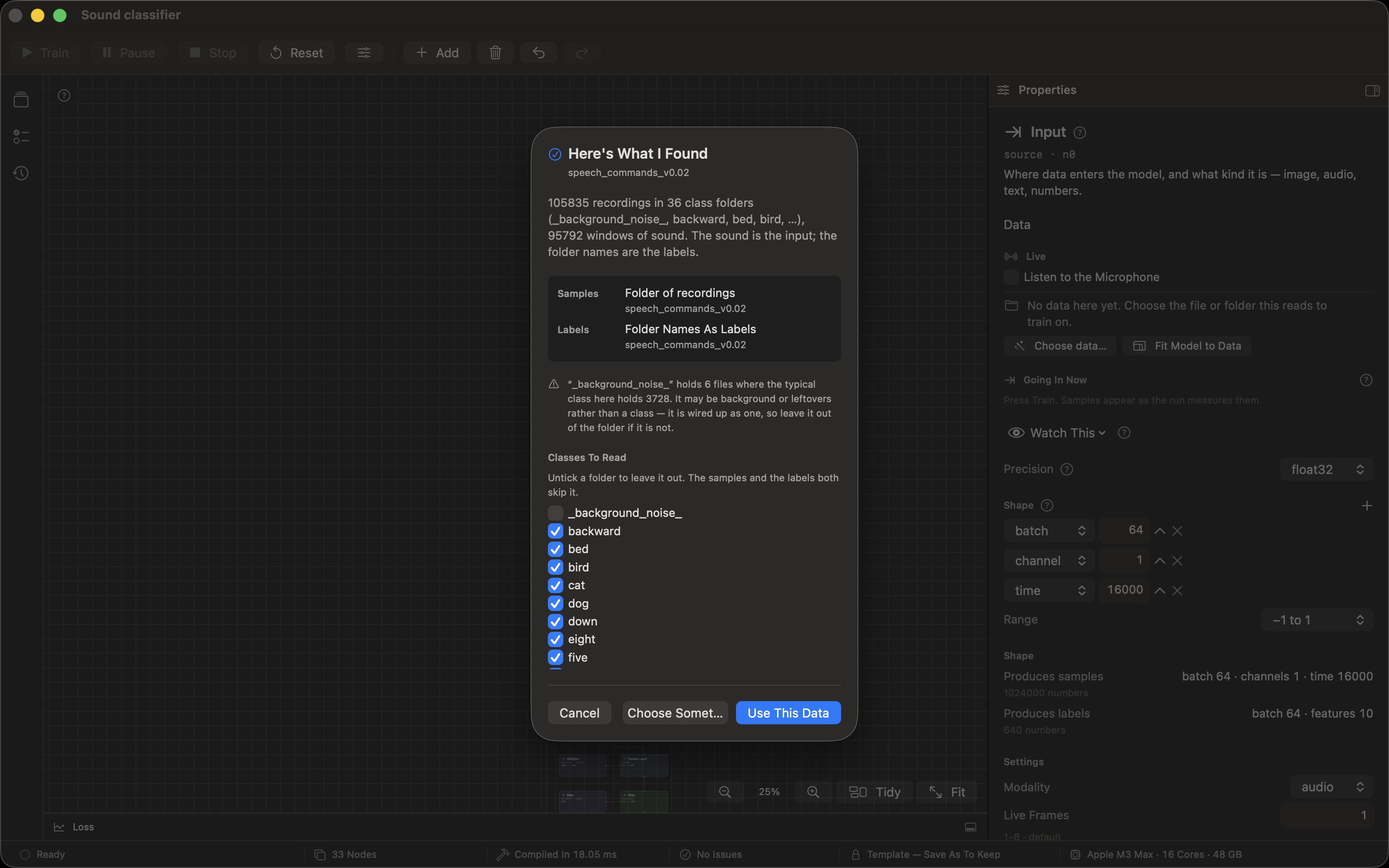
  • A class with far fewer files than the rest is pointed out, and can be left out with a tick
  • Labels that do not match the samples in number raise a warning on the input
  • A folder that cannot be read, or data too large for memory, is refused with the reason and the setting to change
  • A declared test set is held out, and scored on its own

The same inputs can go live: a camera, a microphone or a MIDI instrument in place of the files.

Leaving Selica

Trains here. Leaves when you say.

Training runs on the Mac's own GPU through Apple's graph framework, with no Python environment to set up. When you want to take the model elsewhere, export it as Swift, Core ML, ONNX or PyTorch.

Swiftsource and weights, no dependency on Selica
Core MLa package for any Apple platform
ONNXthe portable form most tools read
PyTorcha module with safetensors weights

Every export of every template is run by its real runtime outside the app on every release, and compared with Selica's own answer, within a small tolerance.

For the technically minded

The canvas is the model.

A Selica project is a graph: nodes are operations, edges are tensors, and the graph is the single source of truth for the editor, the validator, the compiler and the exporters.

The op vocabulary

Convolutions and transposed convolutions, pooling, dense layers, the activations, normalization, dropout, embeddings, attention with causal masking and positional encoding, the common losses – each with a gradient check behind it. Write your own Metal kernel as a node when the set is not enough.

Observation

Loss curve, per-layer gradient norms, activation histograms, parameter health, per-op GPU time, the batch going in and the predictions coming out. Pause at a step boundary, step forward and back, set a breakpoint on any number, watch any expression, compare two runs side by side.

Data in, results out

Inputs typed by modality – image, audio, text, tensor, MIDI – bound to a folder, a file or a device. Readers for image folders, IDX, CSV, series, text, ratings, audio, video and MIDI. Discovery wires the model; Fit Model to Data resizes the layers.

Live mode

Any image, audio or MIDI input switched live. Run becomes continuous; Train becomes continuous too, stepping on every frame, every nth, or a timer, from a buffer you size. The status bar says frames a second, dropped, and whether the model keeps up.

Leaving Selica

Swift with weights, a Core ML package, ONNX, or a PyTorch module with safetensors. ONNX models import, weights included. Checkpoints carry a content hash of the graph that produced them, so the wrong weights cannot load.

Pricing

Try it for thirty days. Buy it once.

One application, free to download. Start the trial in the app and it is all of it for thirty days; after that everything keeps working except exporting, which waits for the licence.

Trial

$0 for 30 days

The whole application from the day you start the trial: the canvas, training, your data, the templates, Try It and live mode. When the thirty days are up, all of that keeps working.

  • Build and train on your Mac's GPU
  • All nineteen templates and ten worked examples
  • Bring your own data
  • Live camera, microphone, MIDI
  • Exports to Swift, Core ML, ONNX, PyTorch (after thirty days)
Coming soon to the Mac App Store

Selica is coming soon to the Mac App Store as a free download, and you start the trial and buy the licence inside the app.

Everything in it

78 features in 10 groups. The trial has all of them for thirty days.

Build models visually

Wire a network on a canvas, with every connection checked as you go.

  • Node canvas every line labelled with the shape it carries; pan, pinch-zoom, Fit and Tidy
  • 74 operations to place grouped by family in a searchable Add menu
  • Named axes batch, channel, height, width, time, feature – a tensor in the wrong order is caught, not misread
  • Parameters beside their layer named by role, showing where their values came from
  • Expressions fold a selection into one named node, and unpack it again
  • Notes on the canvas Markdown beside the nodes it explains
  • Grid and snapping shown or hidden, with its spacing yours to set
  • Undo for everything an accepted suggestion included, in one step

A complete operation library

The modern vocabulary, each operation with a checked gradient.

  • Layers dense, 2-D and 3-D convolution, grouped and transposed convolution, bias, embedding
  • 13 activations ReLU, Leaky ReLU, PReLU, ELU, GELU, SiLU, Mish, Softplus, sigmoid, tanh, hard sigmoid, hard swish, softmax
  • 5 normalisations batch, layer, RMS, instance and group norm
  • Transformer pieces attention with causal masking, positional encoding, embedding
  • 10 losses cross-entropy, binary cross-entropy, squared and absolute error, Huber, KL divergence, detection, HMM likelihood, energy gap, and a weighted total of two
  • Pooling and resampling max and average pooling, resampling, and a spectrogram that turns sound into a picture
  • Randomness and diffusion noise, timestep, diffuse, denoise, FiLM, Fourier features, dropout, random flip
  • Probabilistic models hidden Markov forward pass and Viterbi decode, Bernoulli draws for Boltzmann machines
  • Maths and rearranging add, multiply, divide, log, scale, clamp, cast, reshape, transpose, concat, slice, mean, sum
  • Custom Metal kernels write your own operation, with completion and checking as you type, and your own gradient

Templates and examples

Start from a working model instead of a blank canvas.

  • 29 starting points 19 templates and 10 worked examples, each with a note on how it works
  • Pictures and video image classifier, object detector, video classifier
  • Tables and sequences regression, tabular classifier, forecasting, time-series classifier, recommender
  • Sound, music and text sound classifier, MIDI continuation, two text classifiers, language model
  • Generative and probabilistic autoencoder, denoising autoencoder, Boltzmann machine, Markov chain, hidden Markov model, image generator
  • Worked examples gesture trainer, live detector, sound-event listener, chord companion, whistle synth, motion coach, beat follower, and three that write a kernel

Bring your own data

Drop in a folder, a file or an archive; Selica works out what it is.

  • 29 readers pictures, sound, video and frames, optical flow, YOLO, COCO and VOC boxes, IDX, byte records, tables, series, text, ratings, MIDI
  • Common file types PNG, JPEG, HEIC, TIFF; WAV, AIFF, M4A, MP3, FLAC; MOV, MP4; CSV, TSV; MIDI
  • Dataset discovery 15 layouts recognised: a folder per class, annotated pictures, tables, labelled text, labels in a sibling file or in filenames
  • Archives, all the way down zip, tar and gzip, nested inside each other
  • Fit Model to Data resizes layers, class count and vocabulary to the data, and lists the changes first
  • Held-out test set found beside the training data, or a fifth held back
  • Samples To Read a cap on what is loaded, taken evenly across the dataset
  • Leave a class out untick it; samples and labels both skip it
  • Pictures resized to the size the input declares

Checks and warnings

Mistakes are flagged as you edit, with the fix offered where there is one.

  • 64 validation rules structure, attributes, types, training, media, resampling, expressions, kernels, imports, live capture, linked models, outputs
  • Shapes inferred as you edit a shape that does not fit is marked on the node, and a transpose or reshape offered
  • Labels that do not match a warning when labels and samples differ in number
  • A folder it cannot read named, rather than failing at the first step
  • Data too large for memory refused, with the setting to change
  • A suspiciously small class pointed out when it has under a twentieth of the usual files
  • Every issue explained each links to its numbered rule in Help

Train and watch it learn

Every number is drawn on the canvas while the model trains.

  • Loss chart log or linear, with held-out evaluations marked
  • Per-node statistics activation histograms, mean and spread, gradient norms
  • Parameter health how far weights have moved, the update ratio, the dead fraction, values that stopped being numbers
  • GPU time per node and which operations were fused, from the View menu
  • Watch expressions one number a step from any node: mean, sum, min, max, norm, fraction past a threshold
  • Breakpoints pause when an output or a gradient stops being a number
  • Step through a batch forward node by node, then back through the gradient
  • Edit during a run the change goes into the running model and trained weights are kept where shapes still fit
  • See the batch what is going in now, and what the model guesses
  • Run settings steps, batch size, learning rate, seed; SGD or Adam; GPU alone or with the Neural Engine and CPU

Experiments and evaluation

What you ran, kept, and comparable.

  • Run history every run kept with its settings and curves
  • Compare two runs curves and models side by side
  • Reproduce a run put a past run's model back on the canvas
  • Sweeps vary settings or attributes over a grid, one run a point, the best offered back
  • Fingerprinted checkpoints Save keeps the weights; a checkpoint will not load into a model that has changed
  • Evaluate on the test set a per-class table and confusion report, hardest samples first
  • Accuracy where it means something reported for classifiers, not for regression or reconstruction

Try it, generate, go live

Use the model on your own input.

  • Try It your own picture, recording, sentence or row of numbers
  • Image generation diffusion sampling with a seed; watch the picture form pass by pass
  • Text generation and decoding continue from a seed, or show the hidden state behind every symbol
  • Detection and tracking boxes drawn, tracked across frames, on a video timeline you can scrub
  • Live input camera, microphone or a MIDI port, chosen by device
  • Teach hold a class while the camera or microphone runs, and it learns it
  • Outputs shown on the node, written to a file, or played as sound or MIDI

Import, export and composition

A model can arrive from elsewhere, and leave.

  • Four exports Swift, PyTorch, ONNX and Core ML, each into one folder with its class names
  • Exports checked the same batch through the export and the model, differences shown
  • Proven on every release every template, in every format, run by its real runtime
  • Core ML precision float32 or float16
  • ONNX import with weights an operation it does not know becomes a visible placeholder, never a silent skip
  • Pretrained models ResNet-18 and MobileNetV2, checksum-verified
  • Use As Backbone a fine-tuning model built on a pretrained one
  • Several models a project and one model referenced from another, frozen or trained together

The application

Native, private, and yours.

  • Built-in Help searchable; node, template and rule pages generated from the app itself
  • Node colours a colour per family, for light and dark
  • Autosave and recovery copies kept aside, never over your file
  • Private by design no account, no analytics; feedback and crash reports go only when you send them
  • Requirements macOS 15 or later, on Apple Silicon
  • 30-day trial everything, for thirty days; afterwards only exporting waits for a licence

What a model learns, and how well, depends on the Mac it is trained on as well as on the model and the data. More memory and a faster GPU allow larger models, more data and more steps in the same time, and usually a better result. The data you bring matters as much: how much there is, how well it is labelled, and how evenly its classes are balanced. No accuracy is promised for any model you train or for what it produces.

Screenshots

Ten pictures of the application, as it runs on a Mac. Choose one to see it.

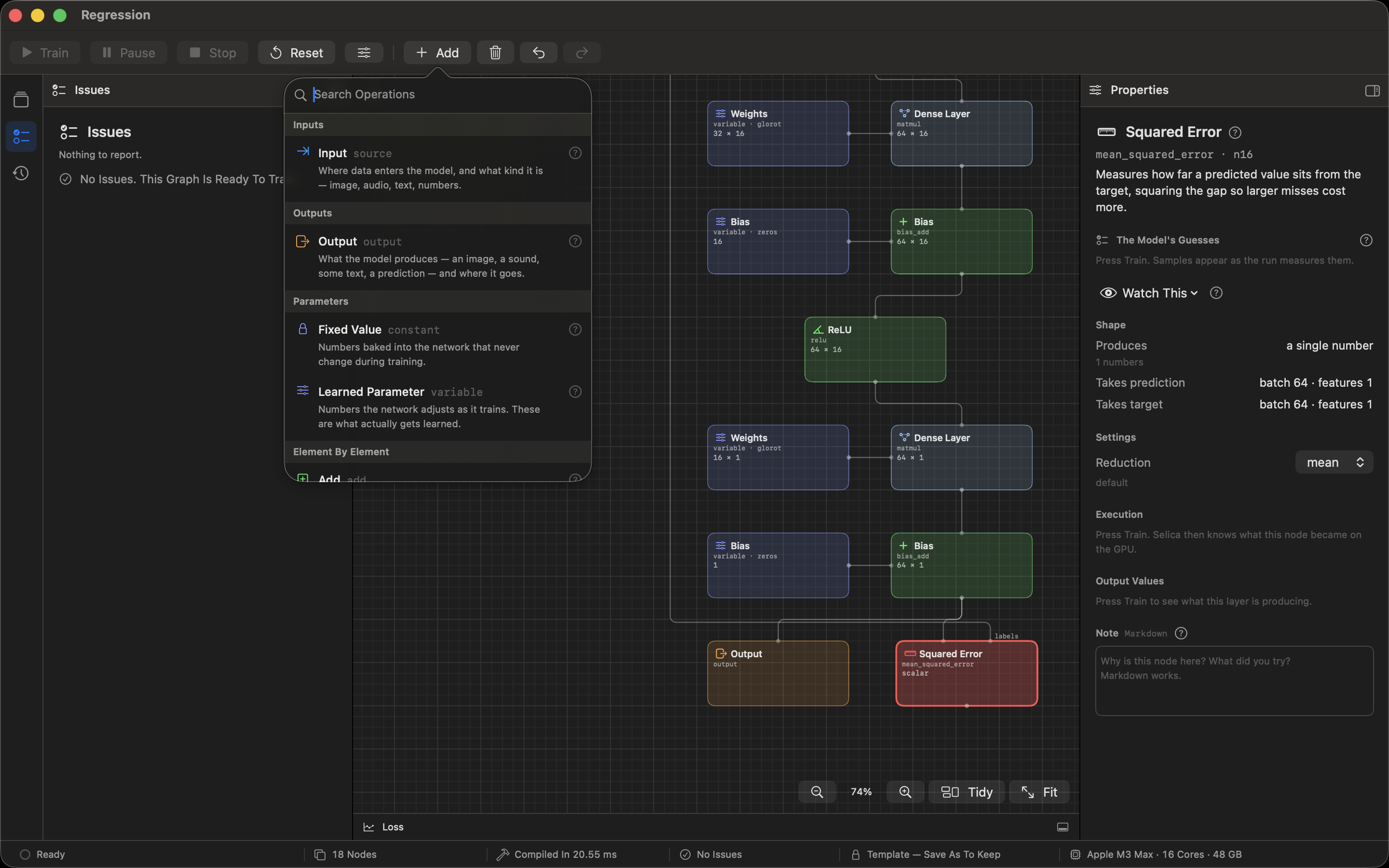
  1. Screenshot 1 of 10: Design on the canvas

    A Regression model wired on the canvas, with the Add menu open to place an operation and its Squared Error loss explained in Properties.

  2. Screenshot 2 of 10: Here's what I found

    A folder of recordings dropped onto a Sound classifier, read as classes from its folder names, with an unusually small class flagged and every class there to keep or leave out.

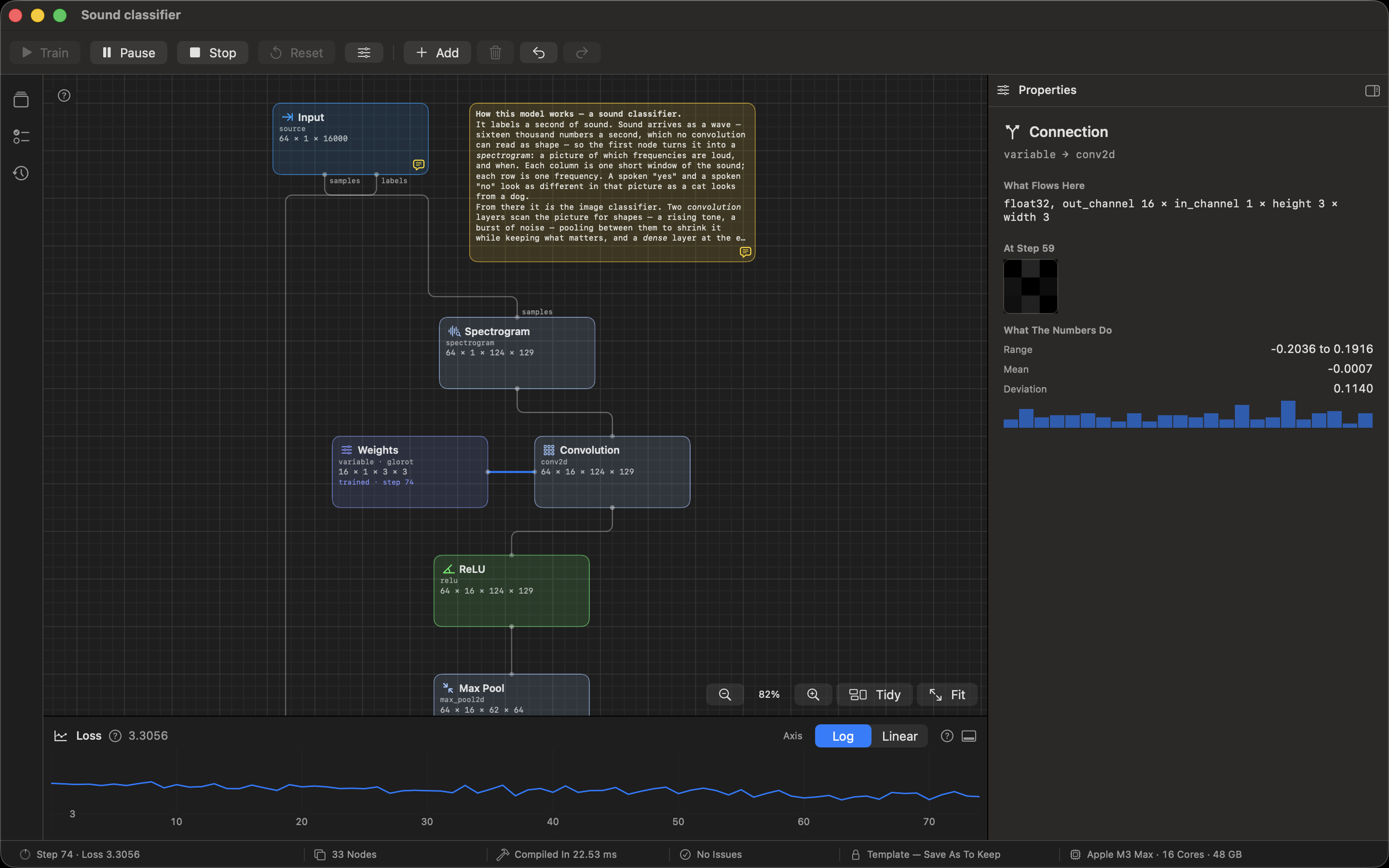
  3. Screenshot 3 of 10: Watching it train

    A Sound classifier mid-training, with a connection selected to show the tensor it carries: its shape, its range, its mean and a histogram of its values.

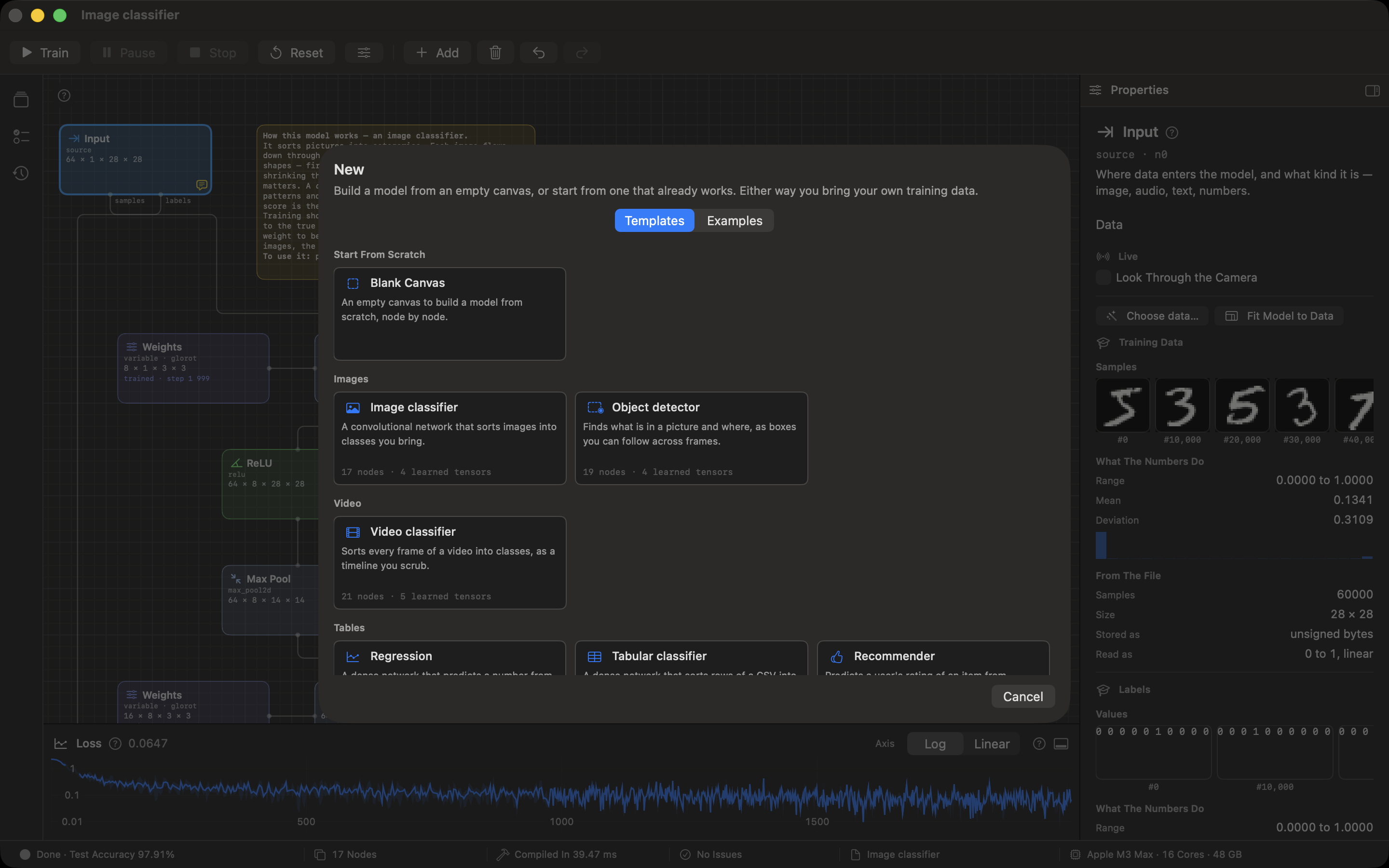
  4. Screenshot 4 of 10: Start from a template

    The New sheet on its Templates page, where a model starts from a blank canvas or from one that already works, such as an image classifier, an object detector or a video classifier.

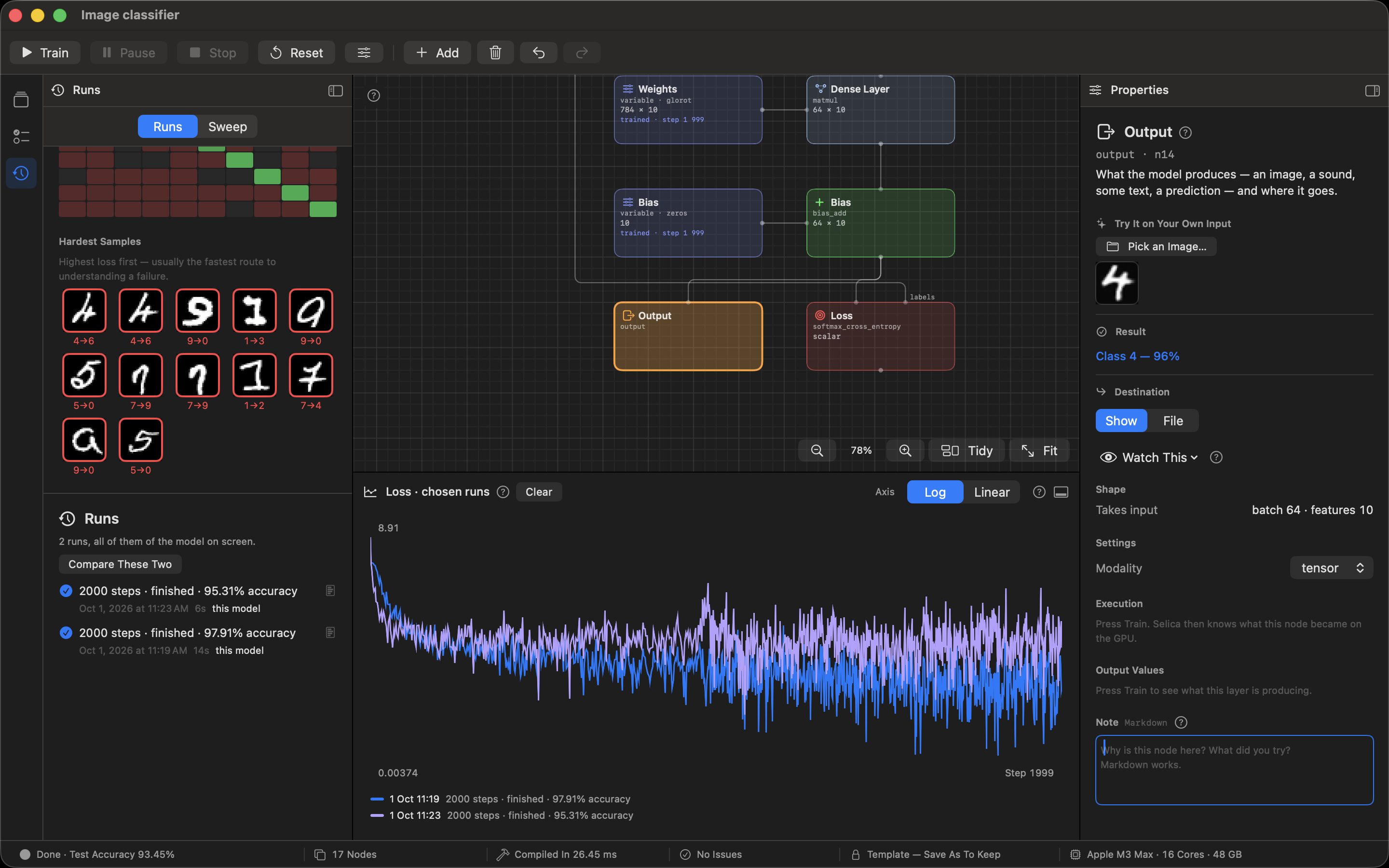
  5. Screenshot 5 of 10: Runs compared

    Two runs of an image classifier compared on one loss chart, beside the samples it found hardest and Try It answering a handwritten 4 on the Output node.

  6. Screenshot 6 of 10: A finished sweep

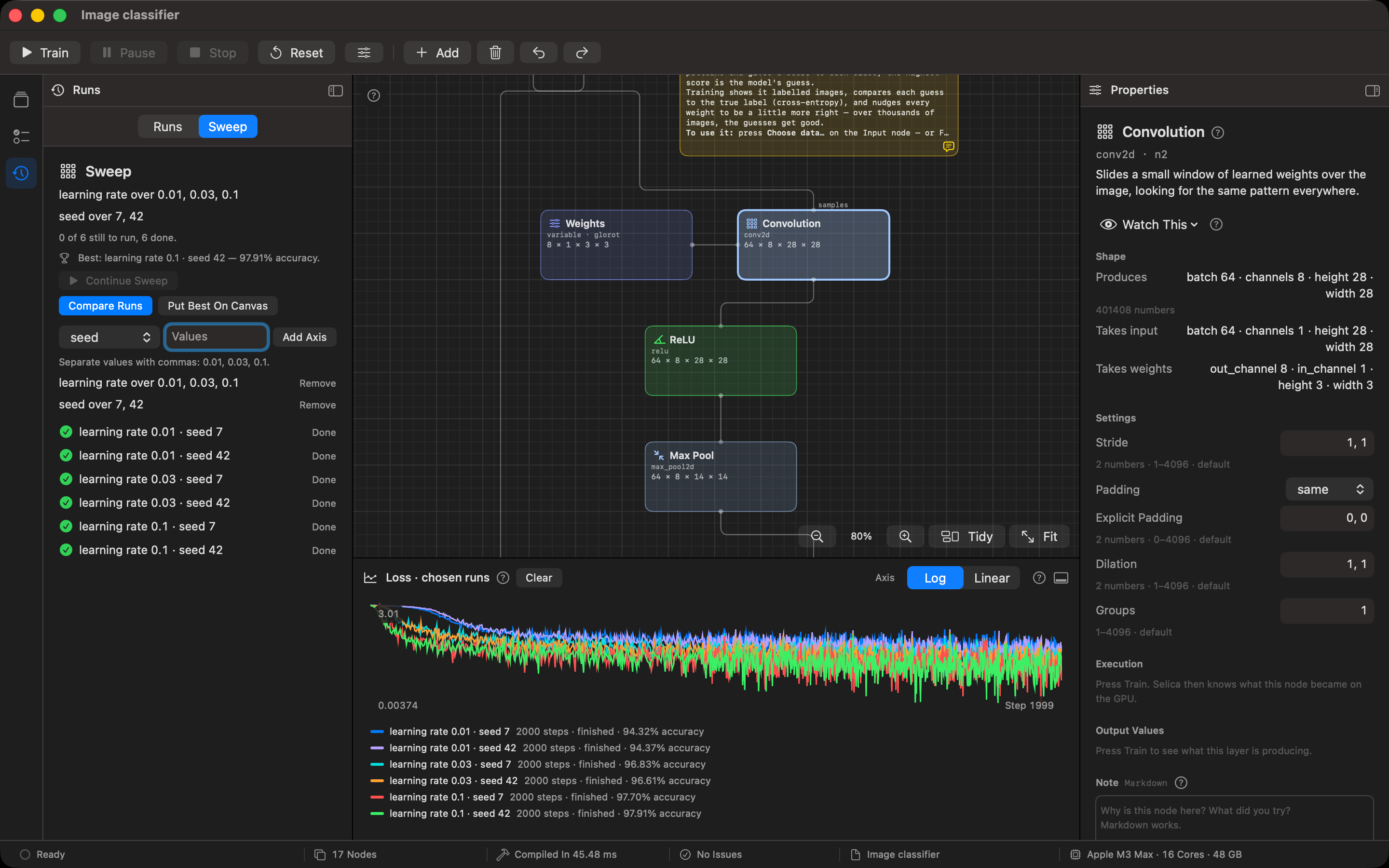
    A sweep of learning rate by seed with all six runs done and drawn on one chart, the best of them named and offered back to the canvas.

  7. Screenshot 7 of 10: Run settings

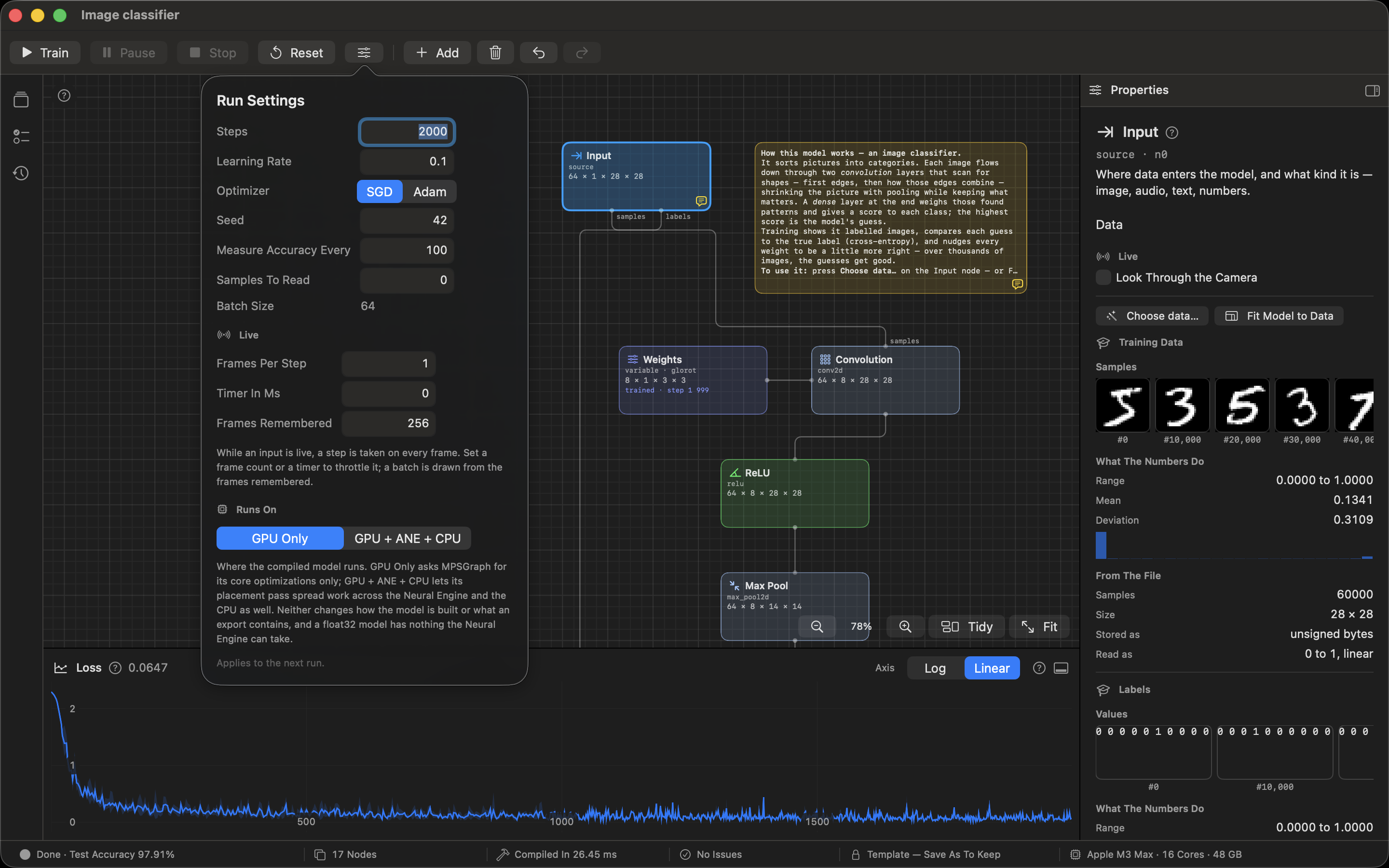
    The Image classifier trained on handwritten digits, with Run Settings open on its steps, learning rate, optimiser, seed, live frames and where the model runs.

  8. Screenshot 8 of 10: Export to Core ML

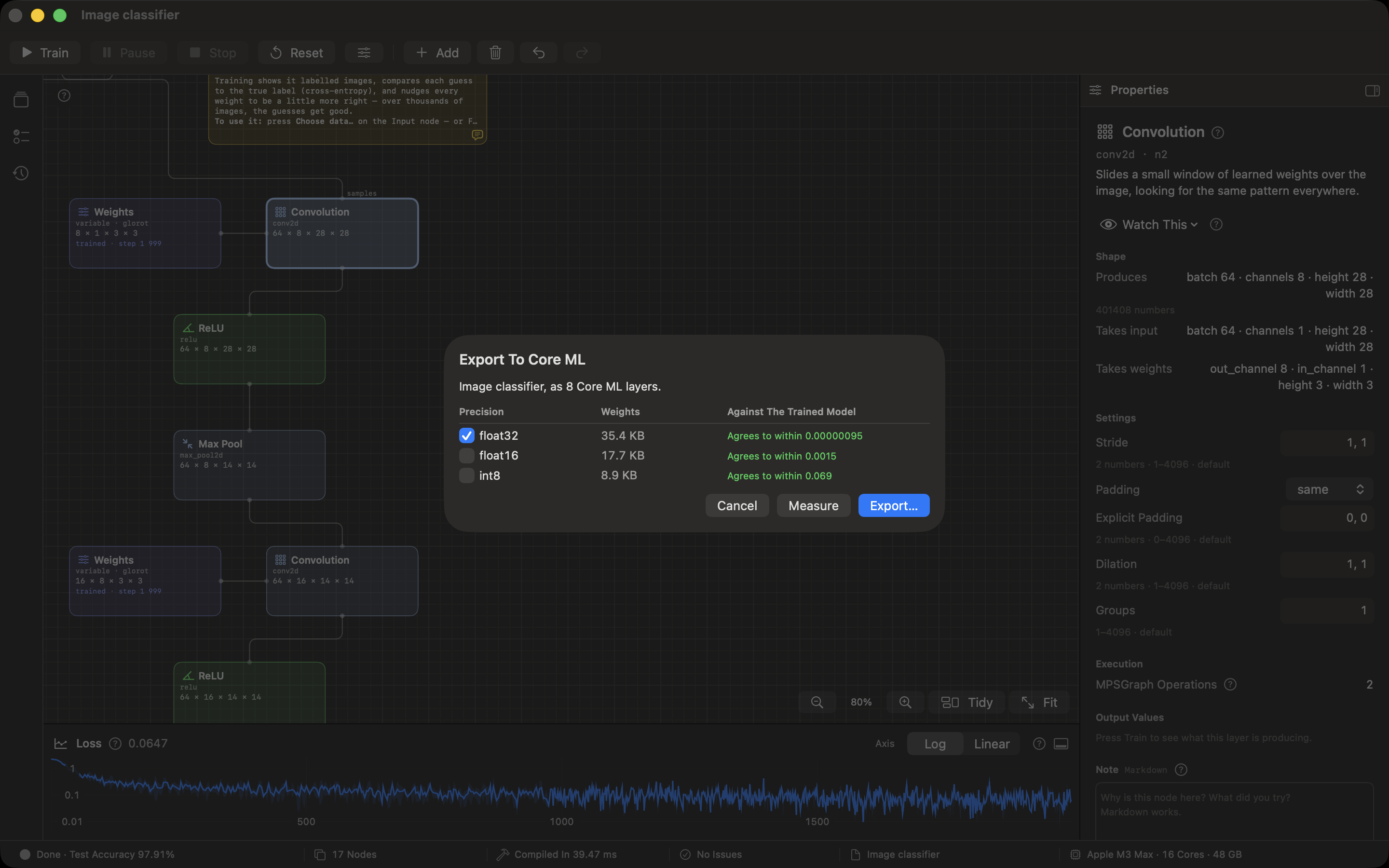
    The Export To Core ML sheet, with float32, float16 and int8 each sized and measured against the trained model before you export.

  9. Screenshot 9 of 10: Built-in Help

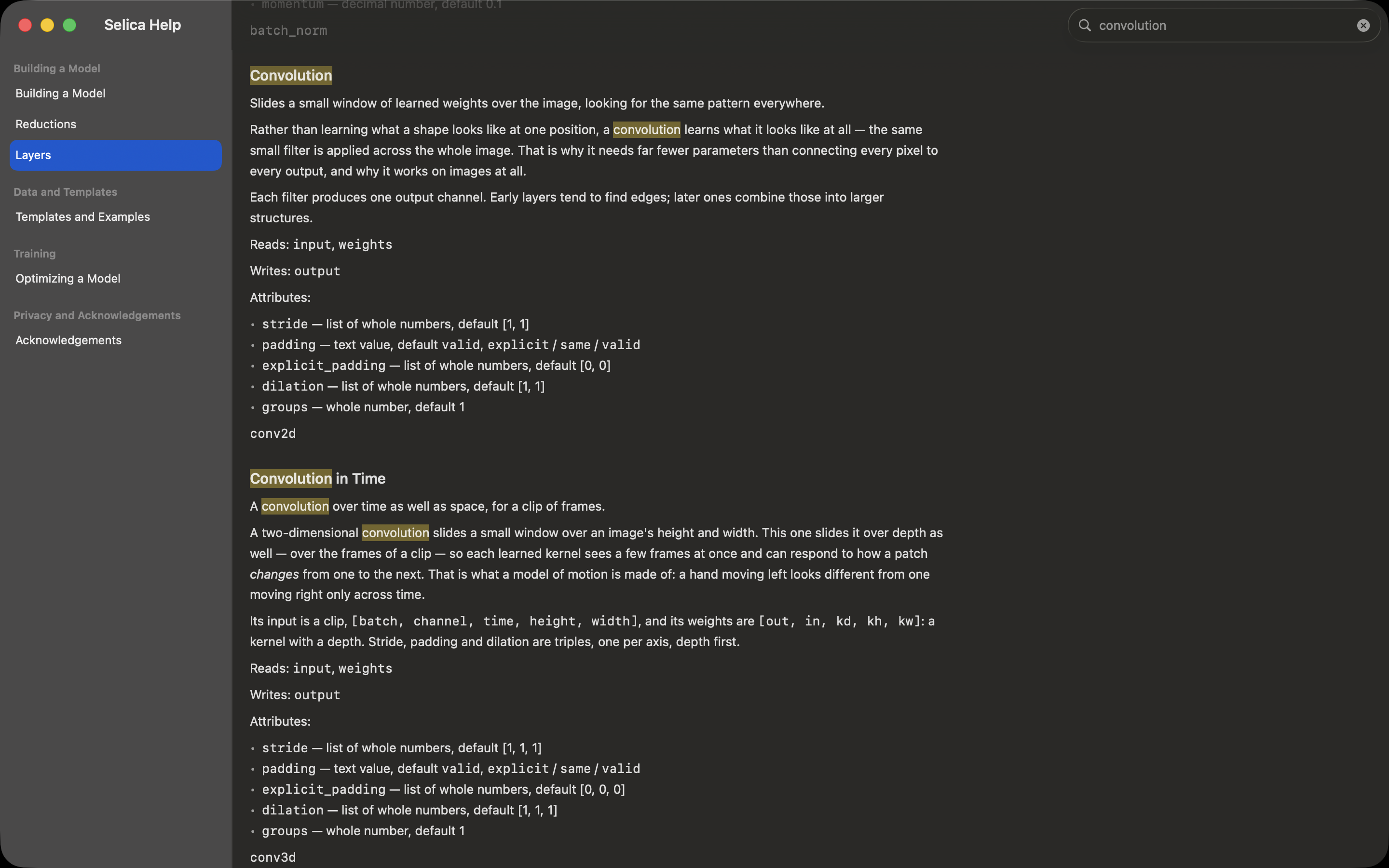
    The Help window searched for convolution and open at the Convolution page, which says what the layer does, what it reads and writes, and each attribute with its default.

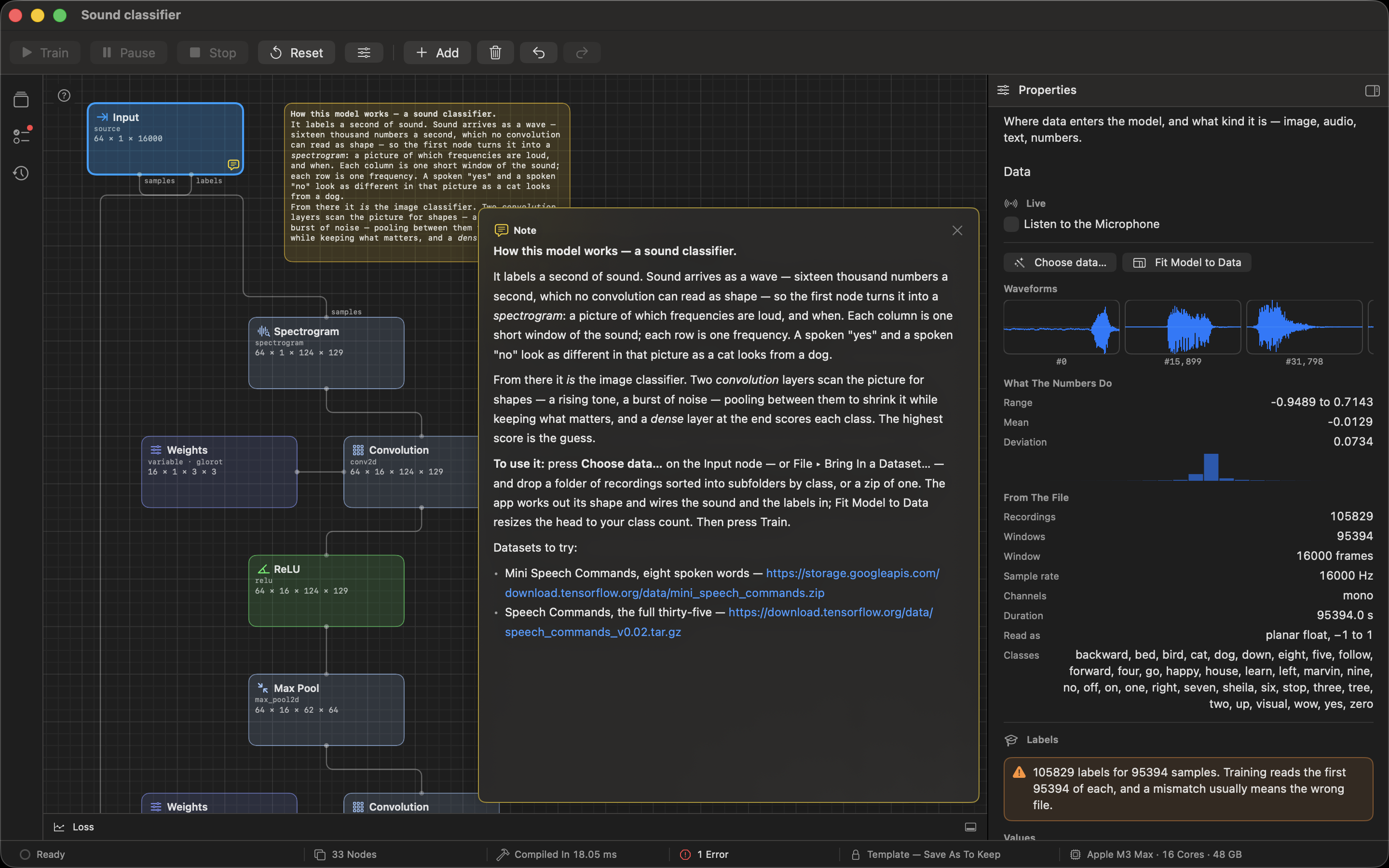
  10. Screenshot 10 of 10: A template's note

    A Sound classifier with its template note open, explaining how the model works, how to use it, and which public datasets to try.

FAQ

Good to know.

What do I need to run Selica?

A Mac with Apple Silicon running macOS 15 or later. Training uses the Mac's GPU through Metal. Selica is a native Mac application, not a web app or a Python environment.

Does Selica come with a dataset?

No. It ships, names and downloads none. You drop a folder, a zip, a CSV, a text file or a MIDI file and it works out the shape. Each template's note lists public datasets to try.

How good will my model be?

That depends on your data and your Mac: how much data there is, how well it is labelled and balanced, and how much memory and GPU the Mac has. No accuracy is promised, so test a model on data it did not train on before you rely on it.

What happens after thirty days?

Nothing you made goes away. The canvas, training, the templates, your data, live mode and Try It keep working; only exporting a model, in any format, waits until you buy the licence. Selica says so when you export, with the licence to buy right there.

How does the licence work?

It is a one-time in-app purchase of $49, made from Settings ▸ Licence and tied to your Apple Account. On another Mac, or after reinstalling, Restore Purchases brings it back. There is no account with Selica and no key to keep.

Where does my data go?

Nowhere. Your data, your model and the training stay on your machine. Selica goes online only to download a pretrained model you ask for and to ask the App Store which licence you own, and links open in your browser; nothing about you or your data is sent.

Another question? Support says how to get help, or write to hi@seli.ca.

Start on your Mac.

A visual environment for designing, training, and monitoring neural networks on Apple Silicon.

Coming soon to the Mac App Store See pricing